Chrome Extension · Manifest V3
Meet Foxie.
Your AI sidekick.
A friendly fox that lives in the corner of every webpage. Ask anything, drag him anywhere, and he reacts to whatever you're doing. Powered by your own free Google Gemini key — zero cost, full privacy.
Free · No account · Your key never leaves your browser.

Lives in your browser
A draggable fox sits in the corner of every page. Click to chat. He remembers where you put him.
Bring your own brain
Plug in a free Google Gemini key. No subscriptions, no tracking, no API bills.
Family-friendly
Foxie is warm, playful, and designed for everyone. He cites his sources when he can.
Pick your Foxie
Three personalities, one fox.
Switch anytime from the chat panel. Foxie remembers your pick per browser.

Companion
Warm, curious, easygoing.
A friendly fox who chats like a thoughtful friend. Best for everyday questions, learning, and casual company.

Coach
Focused, encouraging, direct.
A fox who gets things done. Best for productivity, learning goals, and breaking tasks into clear next steps.

Performer
Playful, theatrical, fun.
A fox who turns answers into tiny moments of delight. Best when you want personality, jokes, and a little sparkle.
FAQ
Quick answers
›Is Foxie really free?
Yes. Foxie uses your own free Google Gemini API key — Google's free tier is generous, and your key stays in your browser.
›Does Foxie read every page I visit?
Only if you turn on page-aware mode in settings. It's off by default. When on, Foxie sends the page title, your selected text, and a short excerpt with your question — nothing else.
›What does Foxie remember?
Tiny notes you save per website (e.g. "I'm learning Spanish here"). They live in your browser only and never sync. Clear them anytime from settings.
›Can I switch personalities later?
Anytime. Open the ⚙︎ in the chat box and pick Companion, Coach, or Performer. Foxie remembers your choice per browser.
›Is it family-friendly?
Foxie is built to be warm and safe for everyone. He sticks to family-friendly tone across all three personalities.
For parents & teachers
Built with families in mind.
- • Three Family modes — Standard, Teen, Kids — that change tone and safety.
- • Google Gemini's own safety controls, surfaced in plain English.
- • Optional 4-digit parent PIN to gate mode changes.
- • No accounts, no tracking, no ads. Notes live in the browser only.
One click. No setup.
Add Foxie to Chrome
Hit the button below and Foxie does the rest — including walking you through getting your free Gemini key.
Install in one click
After install, Foxie opens a quick welcome page that shows you exactly where to click — and offers a guided tour right inside Google AI Studio when you grab your free key.
Web Store listing is in review. In the meantime, scroll down for the developer install.
🛠️ Developer / pro mode install (no Web Store needed)
Until our Web Store listing is approved — or if you'd rather load Foxie unpacked — here's the manual flow. Slightly more clicks, same Foxie.
- 1
Download Foxie
foxie-extension.zip - 2
Unzip the file
Mac: double-click. Windows: right-click → Extract All…. Linux: right-click → Extract Here.
- 3
Open Chrome's extensions page
Chrome blocks website links to its own settings — paste it yourself.
- 4
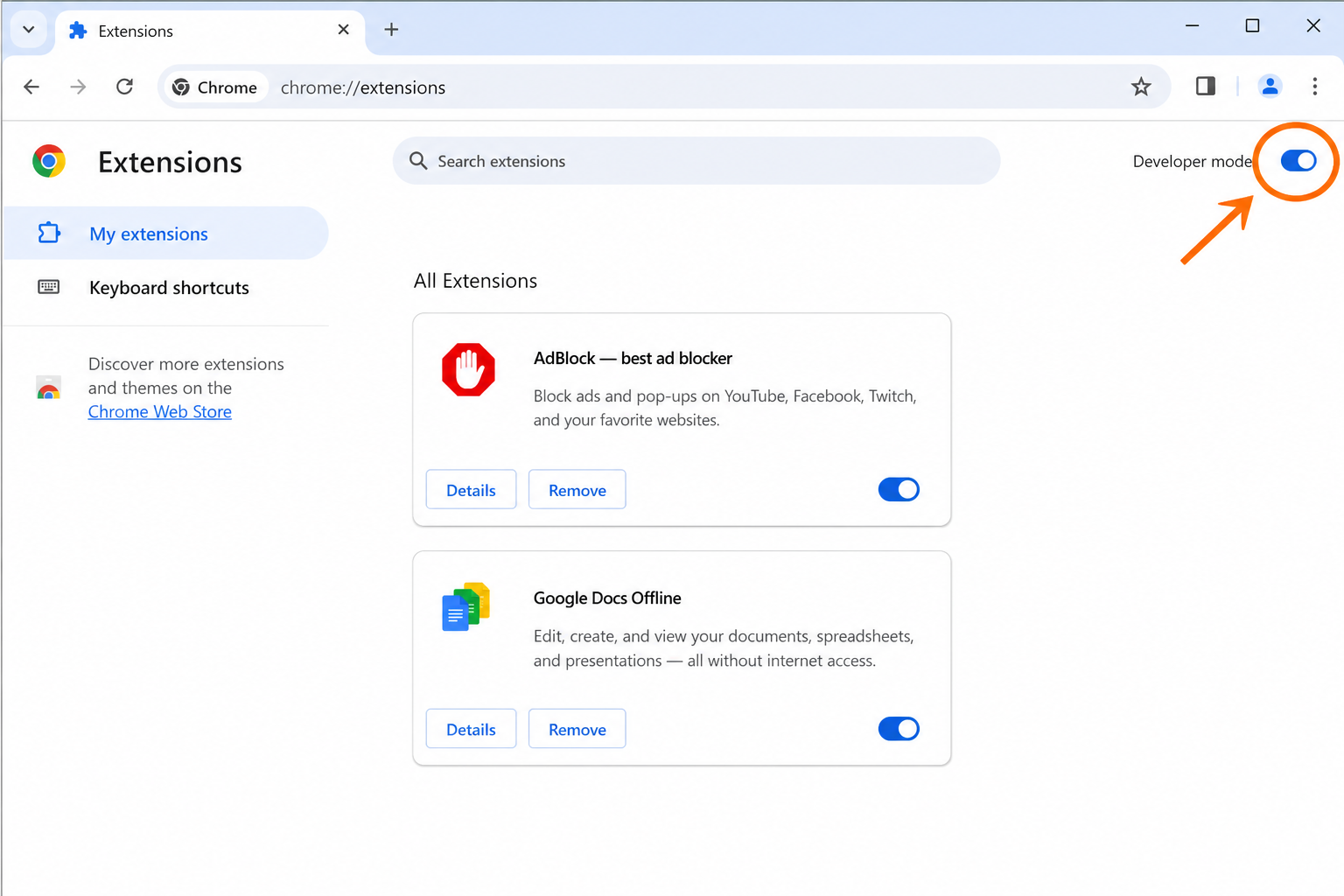
Turn on Developer mode
Top-right of the Extensions page. Three new buttons appear.
- 5
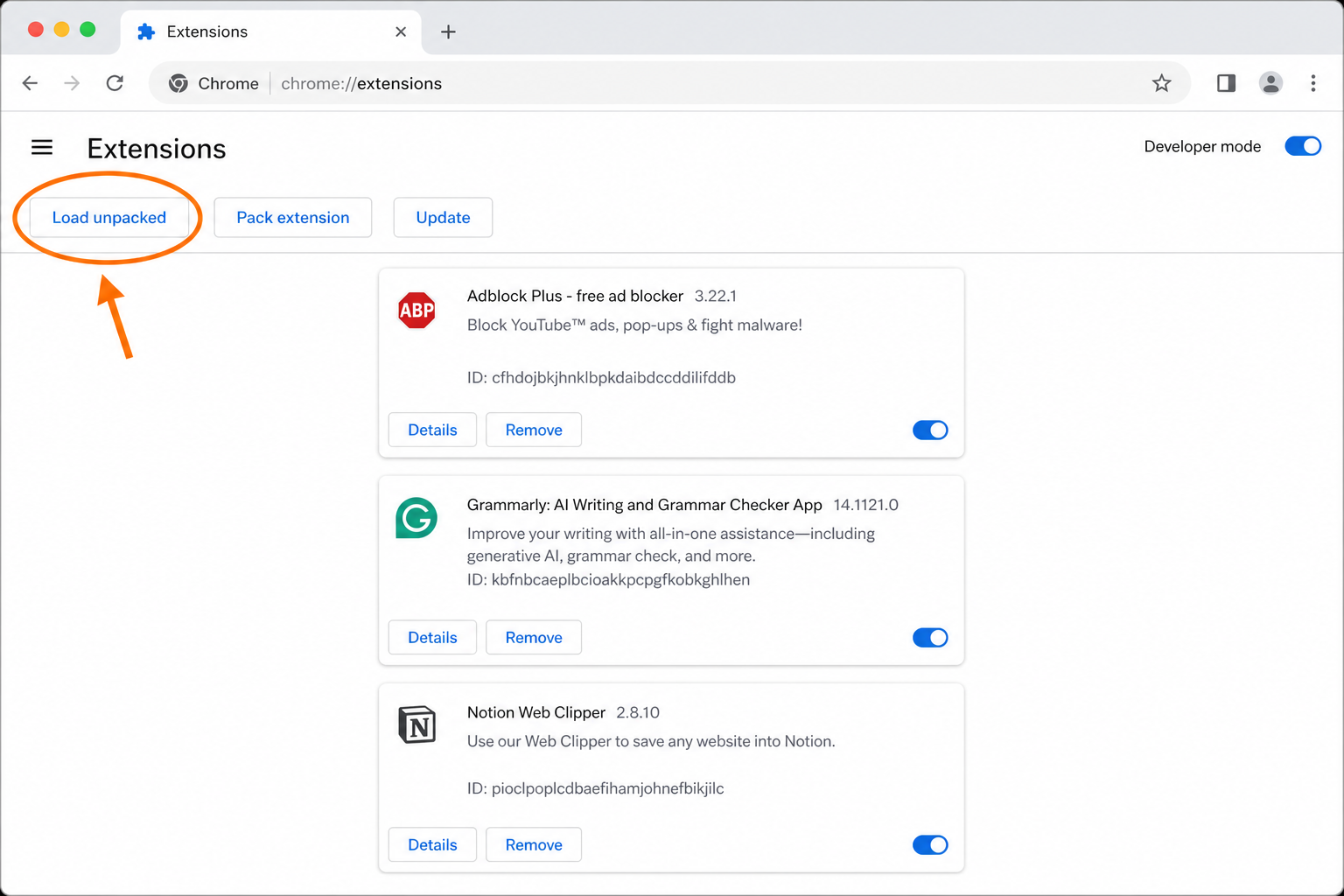
Click 'Load unpacked' → pick the unzipped folder
Pick the foxie-extension folder, not the .zip.
- 6
Pin Foxie & click him
Click the 🧩 puzzle in your toolbar, pin Foxie, then click his face. Paste your Gemini key — done.
Common gotchas
- "Developer mode" is missing. You're in Incognito — open a regular window.
- Load unpacked is greyed out. Toggle Developer mode on first.
- "Manifest file is missing." You picked the .zip instead of the unzipped folder.